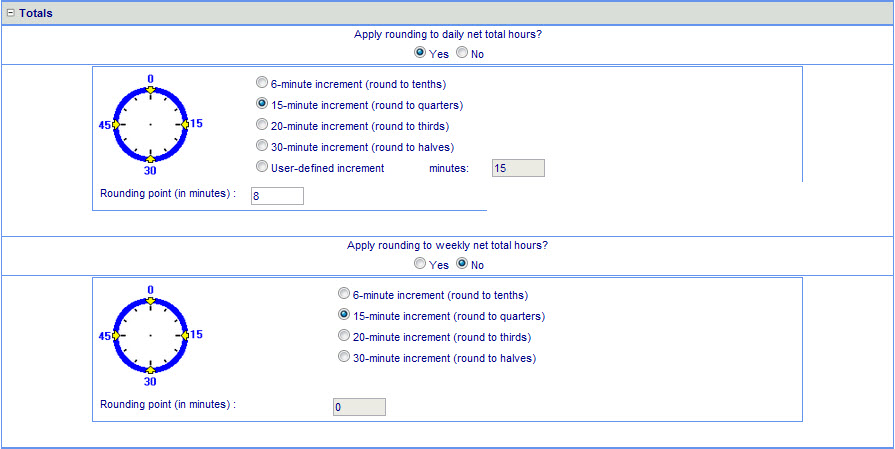
The Policy>Rounding page "Totals" area is used to configure daily hours or weekly hours rounding (continued below).
The Policy>Rounding page "Totals" area is used to configure daily hours or weekly hours rounding. NOVAtime offers two types of rounding: (1) Daily (the most commonly used), and (2) Weekly.
Daily total rounding is a straightforward concept. It is simply the rounding of total actual hours worked for a given day. In the sample timecard provided, the actual work is 7.19 hours (7 hours 11 minutes). But when we apply the 15-minute-increment rounding of total work hours, the total becomes 7.25 hours (7 hours 15 minutes).
When users select Yes, the system will apply rounding on the daily net total hours. If users choose No, then the system will count minute-to-minute net hours worked. In other words, if users disable this option, the system will not perform rounding on the daily net total hours.
The Rounding Point (in minutes) is used to determine whether we round forward or backward. For any time "greater and equal" to the rounding point, it will be rounded to the next time segment. For example, if we have a total work hour of 7 hours 7 minutes, it would be rounded to 7 hours. If we have a daily-total-hour of 7 hours 8 minutes, it will be rounded to 7 hours 15 minutes.
This is a sample timecard illustrating daily total rounding of work hours.
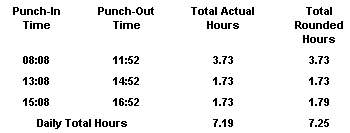
The daily total rounding is 7.25 hours (7 hours 15 minutes), rounded from 7.19 hours (7 hours 11 minutes), because of the 15-minute-increment rounding we selected earlier.
Weekly Total Rounding is simply the rounding of total actual hours worked for a given week. Assume the actual work hour for a week is 40.19 hours (40 hours 11 minutes). But when we apply the 15-minute-increment rounding of total work hours, the total becomes 40.25 hours (40 hours 15 minutes).
When users activate the weekly total rounding, NOVAtime will apply rounding on the weekly net total hours. If users choose No, then the system will count minute-to-minute net hours work. In other words, if users disable this option, the system will not perform rounding.
The Rounding Point (in minutes) is used to determine whether we round forward or backward. For any time "greater and equal" to the rounding point, it will be rounded to the next time segment. For example, if we have a total work hour of 40 hours 7 minutes, it would be rounded to 40 hours. If we have a weekly total hour of 40 hours 8 minutes, it will be rounded to 40 hours 15 minutes.