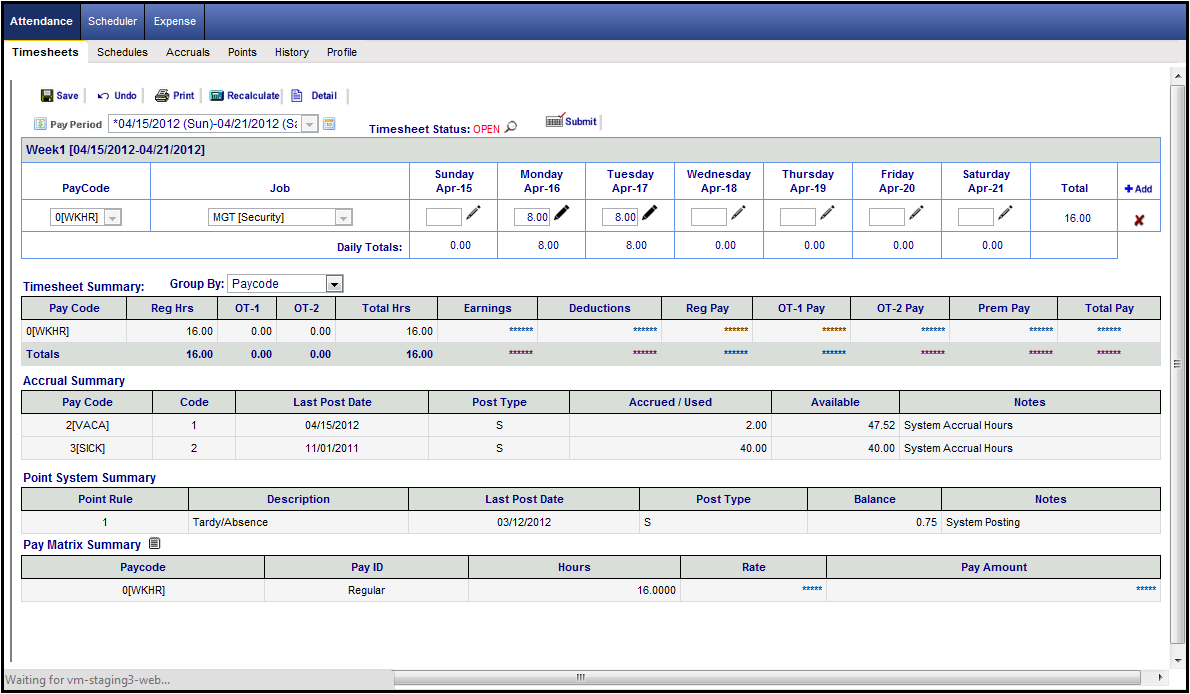
The Timesheet page (hourly format) is used to review and add/edit work hour and absence totals based on pay code and select transfer groups (Department, Job, etc...)(continued below).
The Timesheet page (hourly format) is used to review and add/edit work hour and absence totals based on pay code and select transfer groups (Department, Job, etc...).
Hourly timesheet allows you to input total work hours per pay code, per job, and per workday. Listed below is a sample Hourly Timesheet with the Timesheet Summary section:
It is a daily time tracking solution exclusively designed to reduce the drudgery of paper trail / recording / storage, analyzing and reporting associated with everyday working routine. Hourly Timesheet may be used by:
Project or department leaders who need to have a tracking tool with accurate and well-timed reports on the time and money spent while doing different tasks and projects;
Managers and supervisors, who require organized / structured information to optimize staff management and increase productivity;
Consulting companies, IT / accounting / auditing professionals, lawyers, etc, who need a convenient, accurate, and reliable tool for time-based billing.
Employees, who need to carefully track their time spent on certain tasks, projects and work types;
The following Summary Sections are available in the Hourly Timesheet page:
Timesheet Summary - Summarizes an employee's hours (Regular Hours, OT1, OT2, etc.) as well as earning and deductions based on Pay code and Department (Group). Job automatically defaults to employee home job
Accrual Summary - Visible only if Accrual Module is active. Accrual summary and detail information is also on the Accrual page.
Point System Summary - Visible if Point System module is active. Point System summary and detail information is also on the Point System page.
Pay Matrix Summary - Visible if Pay Matrix module is active.
It shows how the hours are distributed based on Pay Matrix distribution rules (like for Shift Differential or Premium).
Pay Matrix module enhances the system’s ability to distribute employee work hours for shift differential and premium hours, or distribute employee work hours to different pay codes.
Includes a Matrix-style timesheet edit screen with full Pay Matrix Audit trail for ease of resolution for any distribution questions.
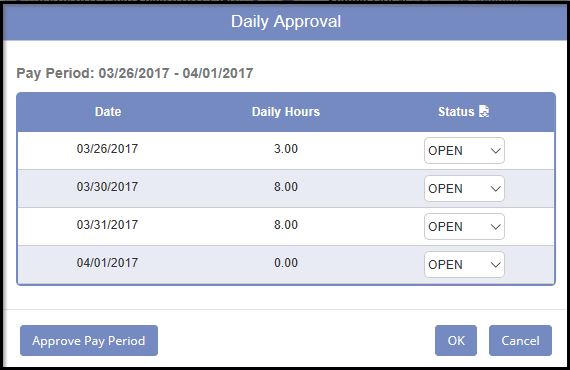
If the system is setup for daily approval, this Attendance Hourly Timesheet Daily Approval page will pop-up:
Sample Accrual Summary – If module is not active, this area will not show.

Sample Point System Summary - If module is not active, this area will not show. 
Sample Pay Matrix Summary - Pay Matrix Module allows for a wide variety of complicated shift differential and Pay Premium computations and distribution of hours. If module is not active, this area will not show.
